

Add another calling number
A workspace can hold more than one number. One is the default. Each number is free for its first month, then $2 a month.
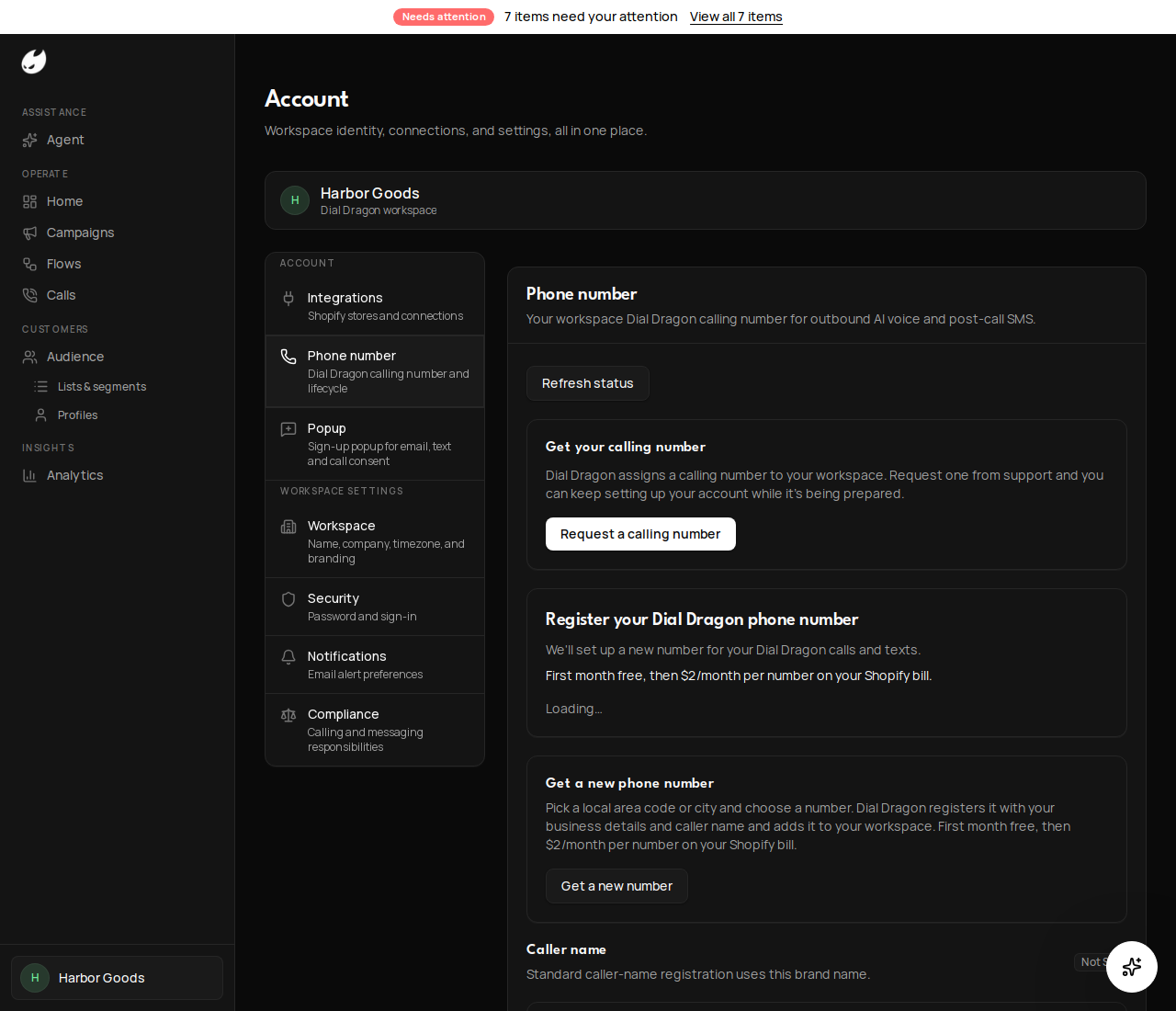
The first number comes from the phone step in setup. After that, Account → Phone number is where more lines are handled.
- 1Open Account → Phone number.
- 2Search by area code, or leave it blank to see available local numbers. You can also search by city. Pick a line. The price is on that form: first month free, then $2 a month for each number, on the Shopify bill.
- 3Press Get this number. It stays off until a number is selected and that price is shown. Dial Dragon registers it with the business details and caller name already on the workspace and emails you right away when your phone number has been approved.
- 4If Get this number says coming soon, you can still browse available numbers, but buying one waits. Use Request a calling number and email support instead. Do not submit a second business registration to force a line.
- 5When more than one number is on the workspace, Set default on the one new programs should start from. Each flow still picks Caller number on page 2, and each campaign picks Caller phone number.
Use as default moves new flows and campaigns to the new line once it is ready. The previous number stays on the workspace until you release it. Release number stops every flow and campaign using that line. You type CANCEL to confirm. Once it is released, it usually cannot be recovered. Pausing a flow does not release a number, and the $2 still starts after that number’s free month. Deleting the whole account is separate: that number is held for 30 days, then released.